| What you do now | The manual way | With AI automation | Rough annual saving |
|---|---|---|---|
| Follow up new enquiries | 3-5 hrs/week, by hand | Replied to in 90 seconds, you review | $8,000-$12,000 |
| Create and send invoices | 2-4 hrs/week, manually | Raised on job completion, sent automatically | $6,000-$10,000 |
| Ask for reviews after a job | 1-2 hrs/week, when you remember | Personalised SMS, triggered automatically | $3,000-$5,000 |
| Chase unpaid invoices | 1-3 hrs/week, awkwardly | Reminder sequence runs itself | $4,000-$8,000 |
| Confirm bookings and schedules | 1-2 hrs/week, by text | Automated SMS and email | $3,000-$6,000 |
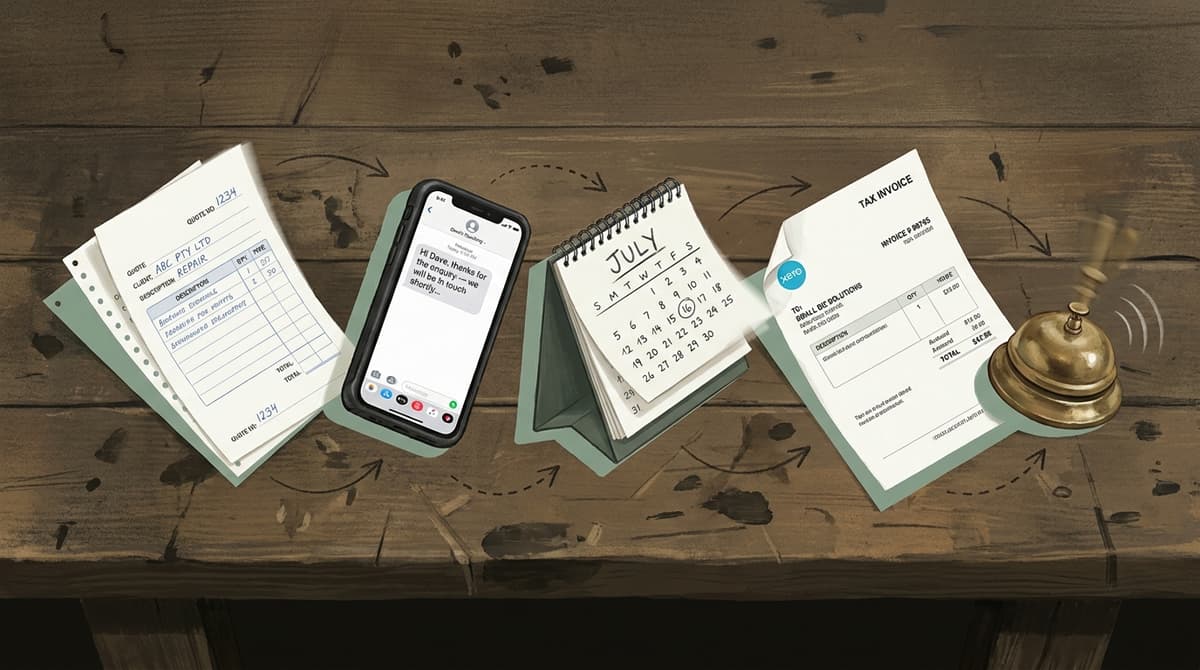
What Is AI Automation, Actually?
AI automation joins two things: a language-model "brain" that can read messy, real-world input, and workflow software that connects your apps and moves data between them. Plain automation follows fixed rules, if a form is submitted, send this email. AI automation copes with variation: an enquiry typed three different ways, a voicemail, a photo of a job, a half-finished question. It reads the context, decides what to do, then hands off to the workflow to actually do it.
Three terms get muddled, so here they are cleanly. Workflow automation connects two or more tools and passes information between them on a trigger, the plumbing. Machine learning is how an AI tool gets better over time by spotting patterns in data, without being re-programmed for each new case. AI automation is the combination: a reasoning layer sitting on top of the plumbing.
You don't need to know which model is under the bonnet. McKinsey's State of AI research finds organisations that put AI into their workflows reporting clear time savings on routine work, and KPMG's April 2026 research puts 63% of Australian businesses at fully or partially operationalised AI, up from 45% a year earlier. The plain guide to automating business processes goes a level deeper than this section; the AI automation Melbourne page covers what a build looks like locally.
AI Automation vs Regular Automation: What's the Difference?
Regular automation is deterministic, same input, same output, every time, while AI automation is probabilistic: it interprets input that varies in wording, format or structure and still produces something useful. Both are worth having.
| Regular automation | AI automation | |
|---|---|---|
| Trigger | Exact match, a form is submitted | Interpreted, an email that reads like an enquiry |
| Reply | One fixed template | Written for the context |
| Setup effort | Low, connectors like Zapier or Make | Moderate, needs a model layer on top |
| Copes with typos and variation | No | Yes |
| Rough cost (AUD/month) | $50-$200 | $200-$800 for a small-business stack |
Most businesses run both: plain automation for the structured stuff like invoicing and booking confirmations, an AI layer for anything customer-facing or unpredictable like sorting enquiries or drafting replies. If you want the build order, what to wire first, second, third, the simplest small-business automation tasks for 2026 lays it out, and customer onboarding automation for service businesses shows the pattern after the sale. The short version: start where you lose the most hours, not where the tech looks cleverest.
What Can AI Automation Do for a Business Right Now?
Right now, AI automation reliably handles three jobs for a small business: replying to new enquiries fast, raising and chasing invoices, and asking for reviews after a job. Not "run the company", but those three are most of the admin you'd want off your plate.
Speed-to-lead. A new enquiry, website form, missed call or social DM, gets an SMS inside 90 seconds, an email follow-up the next day if there's no reply, and only lands on your desk once they respond. Harvard Business Review research by Oldroyd et al. found firms responding within an hour are about 7x more likely to qualify a lead, 60x more than those that wait a day.
Invoicing and chasing payment. When a job is marked done, the invoice is raised in your accounting tool, sent, and a reminder queued if it's unpaid a week later. Xero's Small Business Insights tracks how long Australian small businesses wait to get paid; an automated reminder reliably pulls that in.
Reviews. A personalised SMS after the job, with the customer's name and the job on it, sent automatically, beats a generic blast. Most owners skip it. The step-by-step instant follow-up sequence is a good first build.
A Speed-to-Lead Workflow You Can Copy
This is the highest-value automation for almost any service business, and it's one workflow, not a project: catch the enquiry, reply in seconds, log it, follow up once, then go quiet until they answer. Build it in Make, or n8n or Zapier, or hand the spec below to whoever sets up your systems.
The discipline is keeping it small. The version that works is four steps and one alert. The version that breaks is the one with twelve branches, a dashboard and a "phase two." Ship the small one, watch it for a fortnight, then add the next workflow.
SPEED-TO-LEAD AUTOMATION (build spec)
maps Trigger -> Action -> Result for Make / n8n / Zapier

TRIGGER:
  source: website_form OR missed_call_webhook OR social_lead
  fires_on: new_enquiry

STEP 1, Immediate SMS (within 90 seconds):
  send: "Hi {{first_name}}, thanks for getting in touch about {{job_type}}.
         We'll be in contact shortly, [Your Business]"

STEP 2, Log to your CRM:
  create_contact: [name, phone, email, job_type, source, timestamp]
  # timestamp lets you measure speed-to-contact later

STEP 3, Wait 24 hours, then if no reply:
  send_email: "Still keen for a quote, {{first_name}}? Reply here or call [number]."

STEP 4, On any reply from the lead:
  alert_owner: SMS or Slack with a one-line lead summary
  # you only ever see warm leads, not every enquiry
A sequence like this takes a couple of days to set up and then runs without you. If you'd rather not build it, our inbound lead management service wires exactly this into your stack.
How Much Does AI Automation Cost a Small Business in Australia?
AI automation for an Australian small business typically runs $200-$800 AUD a month for a working stack covering enquiry follow-up, invoicing and review requests; setup is a one-off on top. Done yourself it's 20-40 hours and a fair bit of fiddling. Done for you, a foundational stack is usually a one-off under $5,000 AUD; the ASBFEO keeps neutral small-business technology guidance worth reading before you spend anything.
| Component | Tool options | Monthly cost (AUD) |
|---|---|---|
| Workflow engine | Make, n8n, Zapier | $50-$200 |
| AI layer, a language model | OpenAI, Anthropic | $30-$150 |
| CRM / lead tracking | HubSpot Free, GoHighLevel | $0-$200 |
| SMS sending | Twilio, MessageBird | $50-$150 |
| Job / field software | ServiceM8, Tradify, AroFlo | $50-$150 |
| Total | $180-$850 |
In the audits we run, most stacks pay the setup back inside two to three months from time saved alone, before you count a single extra job won from faster replies. The automation audit gives you a rough figure from your own admin hours, and the case studies page shows what it looks like in practice.
Is AI Automation Worth It for a Small Business or Sole Trader?
Yes, if you're losing real hours to tasks that follow the same pattern every week. Quoting, invoicing, following up and asking for reviews by hand runs 8-15 hours a week for a lot of sole traders. At $80-$120 AUD a billable hour, that's $640-$1,800 of your time a week going to admin you could hand off.
The honest caveat: it's not worth it for one-off or wildly variable work. If every job is genuinely different and needs bespoke communication, the setup won't pay back. But standard service work, electrical, plumbing, cleaning, landscaping, accounting, consulting, repeats enough that a few workflows earn their keep fast. That 44% from McKinsey's Australia automation analysis is the national average; for an admin-heavy business the real share is higher. The best marketing automation software for Australia is the next read if marketing is your bottleneck rather than admin.
What We Keep Seeing When We Track Our Own AI Citations
Watching which of our articles get pulled into ChatGPT, Perplexity and Google's AI Overviews, three things stand out. First, the questions that earn a citation are almost never "what is AI automation" in the abstract, they're task-shaped: "how do I stop chasing late invoices", "how do I reply to enquiries faster". Second, across the 146 sites we've scored on our AI-search rubric the average lands at 52.8 out of 100, so most business content simply isn't built to be quoted by a machine. Third, the pages that do get cited are the boring, specific, well-sourced ones, not the clever ones. That's the same reason a few tight workflows beat one ambitious "AI strategy", and the same logic behind our SEO and AI search service: being found in Google and quoted by AI is itself an automatable workflow. The client onboarding automation for accountants piece shows the pattern inside one vertical.
What Tools Do Australian SMBs Use for AI Automation?
The common 2026 stack is three layers: a workflow engine to move data, a model layer for the thinking, and the business software you already run. Most owners already pay for half of it.
Workflow engines are the connective tissue. Make and n8n are cheapest at scale; Zapier is friendliest to start but gets dear as volume grows, the n8n vs Zapier comparison covers the trade-off. Model layers add the judgement: drafting replies, sorting enquiries, pulling job details from free text. OpenAI and Anthropic cover most of it. Business software is where it plugs in: ServiceM8, Tradify, simPRO and AroFlo fire webhooks on a status change, and Xero and MYOB take the invoice and the reminder. MYOB's small-business research keeps finding owners losing hours a week to financial admin.
A free 30-minute automation audit maps your first three workflows to the tools you already run. We also cover Sydney, Brisbane, Perth, Adelaide and the rest of Australia; the Melbourne automation consultant explainer covers what to expect from one.

Frequently Asked Questions
What's the first thing a small business should automate?
The best first automation is enquiry follow-up: it happens constantly and the payoff is immediate. A single workflow can reply to a new lead in seconds, follow up the next day, and flag you only when they respond. Harvard Business Review research found firms that respond within an hour are about 7x more likely to qualify a lead than those that wait an hour longer. Start where you lose the most hours, then add the next workflow.
How much does AI automation cost for an Australian small business?
For an Australian small business, a working AI automation stack runs about $200-$800 AUD a month, a workflow engine like Make or Zapier, a model layer from OpenAI or Anthropic, and an SMS tool like Twilio, plus the job software you already pay for. A professionally built foundational stack is usually a one-off under $5,000 AUD. Most setups recover that within two to three months from time saved, before counting extra work won from faster replies.
Does AI automation replace staff?
AI automation usually doesn't replace a person; it removes the repetitive admin a person was doing badly between real work, the follow-ups, the invoice chasing, the review requests. It frees up hours rather than headcount. The exception is high-volume, low-judgement inbox work, where it can absorb most of the load. For a small team the honest framing is your existing people stop doing the boring half of their job, not you let someone go.
What's the difference between AI automation and regular automation?
Regular automation follows fixed rules, if X happens, do Y, so it only works when the input is clean and predictable. AI automation adds a model layer that can read messy input, an enquiry worded three ways, a voicemail, a photo, and still decide what to do. Most businesses use both: plain automation for structured tasks like invoicing and booking confirmations, an AI layer for anything customer-facing or unstructured like sorting leads or drafting replies.
Do automated customer messages need to follow Australian law?
Yes. Automated SMS and email to customers must comply with the Spam Act 2003: you need the recipient's consent, clear identification of who's sending, and a working unsubscribe. If your automation stores or handles customer personal data, the Privacy Act 1988 and the Australian Privacy Principles apply too, with stricter obligations once your turnover passes $3M AUD. Build consent and unsubscribe into the workflow from day one rather than bolting it on later.
How long until AI automation actually pays off?
Most Australian businesses see something measurable inside the first two to four weeks, faster invoice payment, fewer missed enquiries, hours back on follow-up. Full payback on the setup cost typically lands around two to three months. Enquiry follow-up shows results fastest because the change in response time is instant and the effect on conversion is direct; invoicing and reviews build more slowly but compound, since paid-faster and more-reviews both keep adding up.
Related Reading
- What Is Answer Engine Optimisation (AEO)?
- What Is AI Search Optimisation? An Australian Plain-English Guide
- The Plain Guide to Automating Business Processes in Australia, the level-up from this article once you've picked a workflow
- The Simplest Small-Business Automation Tasks for 2026, the build order, easiest wins first
- Customer Onboarding Automation for Service Businesses, the same pattern applied after the sale
- n8n vs Zapier for Australian Small Business, the workflow-engine decision, made simple
- How to Send Instant Follow-Up Emails to Leads Automatically, the speed-to-lead workflow, step by step
Sources
- McKinsey, The State of AI (Global Survey)
- McKinsey, Australia's Automation Opportunity
- KPMG Australia, Australia Leads World on Responsible AI, Lags Productivity Gains (April 2026)
- Harvard Business Review, The Short Life of Online Sales Leads (Oldroyd et al.)
- Xero, Small Business Insights
- MYOB, Small Business Research Reports
- ASBFEO, Small Business Technology Guidance
- Spam Act 2003 (Federal Register of Legislation)
- Privacy Act 1988 and the Australian Privacy Principles (OAIC)